Get Even Numbers Using Java Stream API

Java Stream API — Even Numbers (Full Screen) Java Stream API — Get Even Numbers Example 1 — Filter even numbers from a list Creates a list, uses Stream to filter evens, and prints them. Copy import java.util.*; import java.util.stream.*; public class EvenNumbersStream { public static void main(String[] args) { // Create a list of numbers List<Integer> numbers = Arrays.asList(1, 2, 3, 4, 5, 6, 7, 8, 9, 10); // Use Stream API to filter even numbers List<Integer> evenNumbers = numbers.stream() .filter(n -> n % 2 == 0) .collect(Collectors.toList()); // Print the even numbers System.out.println( "Even numbers: " + evenNumbers); } } Example 2 — Use IntStream.rangeClosed ...

Swap Two Numbers Using Bitwise Operator in C-Language


In this C program we will Swap Two numbers using Bitwise Operators and then we will print the result on the screen. The Numbers will be taken from the user.

input:

The Numbers (integers) (i.e. 5,45,75 etc.)

output:

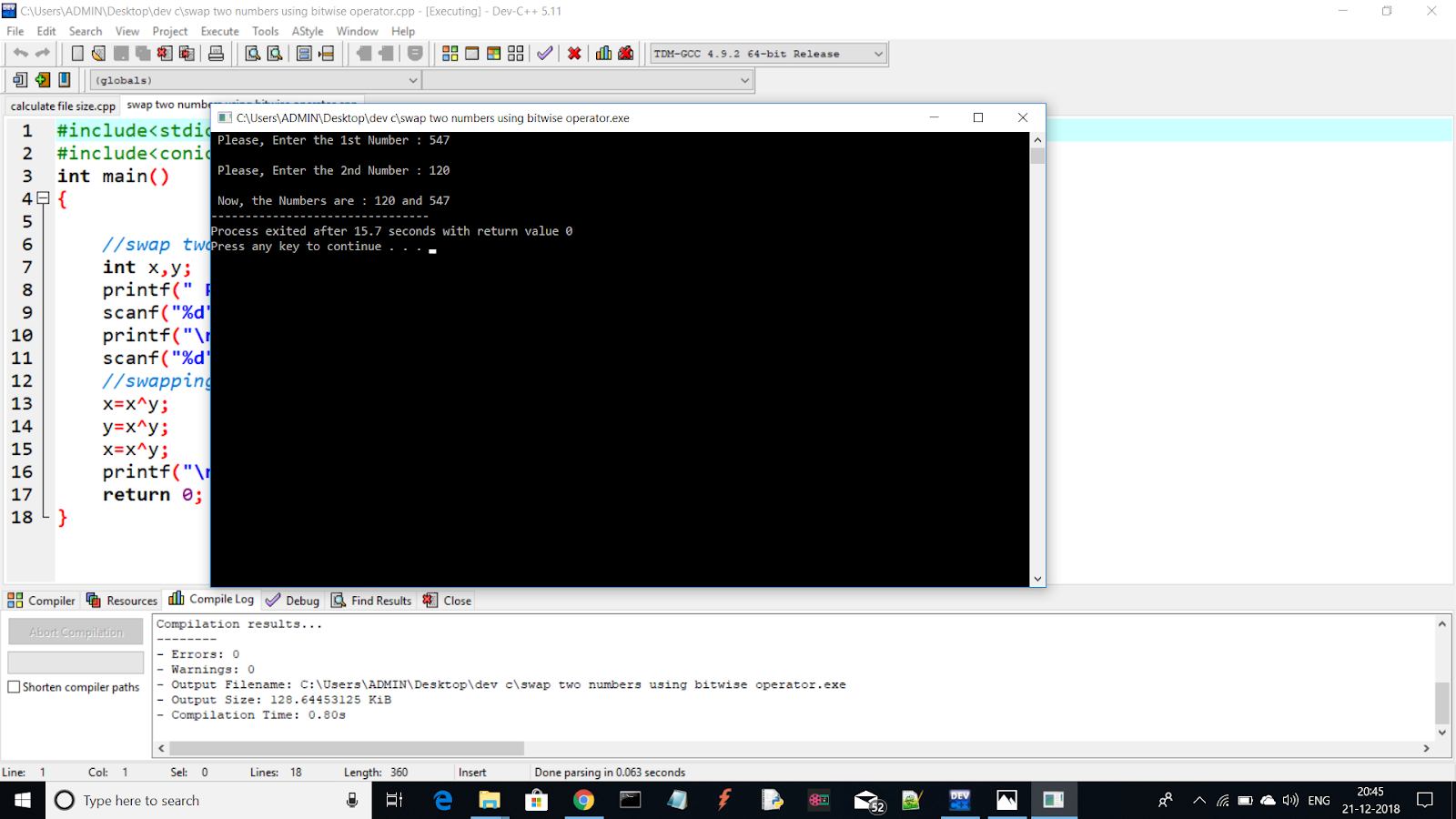
After Swapping the Numbers will be printed on the screen.

CODE---->


#include<stdio.h>
#include<conio.h>
int main()
{
	
	//swap two numbers using bitwise operator
	int x,y;
	printf(" Please, Enter the 1st Number : ");
	scanf("%d",&x);
	printf("\n Please, Enter the 2nd Number : ");
	scanf("%d",&y);
	//swapping -------->>
	x=x^y;
	y=x^y;
	x=x^y;
	printf("\n Now, the Numbers are : %d and %d",x,y);
	return 0;
}


Don't just read, write it, run it.....

RESULT:


If the program is not running, you can remove the second line from the code(i.e: #include<conio.h> )

Comments

Popular posts from this blog

C++ program to print " Hello world !!! "

In this C++ program we will print "Hello world !!!". input: Null. output: " Hello world !!! " will be printed on the screen. CODE----> #include<iostream> using namespace std ; int main () { cout << " Hello world !!! " ; return 0 ; } Download the C++ Program file of this Program. Don't just read, run on your pc !!! Images for better understanding : Hello world !!! -------------------------------- Process exited after 0.3679 seconds with return value 0 Press any key to continue . . . Don't just read, write it, run it..... RESULT : Also on Youtube :

Linear Queue Program in C-Language

In this C program we will perform operations over Linear Queue ( i.e: Data insert Operation, Data remove Operation and display Operation ). The Choice( i.e: data insert,remove or display ) will be made by the user and The Number will be taken from the user( i.e: For Data insert Operation ). input: The Choice(i.e Data insert, remove or display) & The Number (integers) (i.e. for Data insert Operations) (15,10,128 etc.) output: The Operations will be excecuted as choosen by the user. CODE----> #include<stdio.h> #include<stdlib.h> #define MAXSIZE 10 int Q [ MAXSIZE ], front =- 1 , rear =- 1 ; void qinsert ( int x ) { if ( rear == MAXSIZE - 1 ) printf ( "\n Queue is Full." ); else if ( front ==- 1 ) { front = 0 ; rear = 0 ; Q [ front ]= x ; } else { rear ++; Q [ rear ]= x ; } } void qdelete () { if ( front ==- 1 ) printf ( "\n Queue is Empty." ); else if ( front == rear ) { printf ( ...

C-program of printing "Hello World", 10 times on the screen.

In this C program we will print "Hello World", 10 times on the screen. We will use "body-less-loop" for this C-Program. "Body-less-loop" : it means that the inner part(code block to be executed) of the loop will be empty and the loop will have a semi-colon(;) in it's end. i.e: for ( .....  ; .....  ; .....  ) ; input: Null. output: "Hello World" will be printed on the screen, 10 times. CODE----> #include<stdio.h> int main() {      int i;      for( i=1 ; i ;printf( "   Hello World ! \n ", i++ )) ;      return 0 ; } Don't just read, write it, run it..... RESULT :